Use case · Knowledge Center
AI that already knows your brand.
Checkgrow keeps your company, brand, products and buyers in one Knowledge Center. Everything it writes for you, from campaign ideas to posts and creatives, starts from that source, so the first draft already sounds like you instead of like every other AI tool.

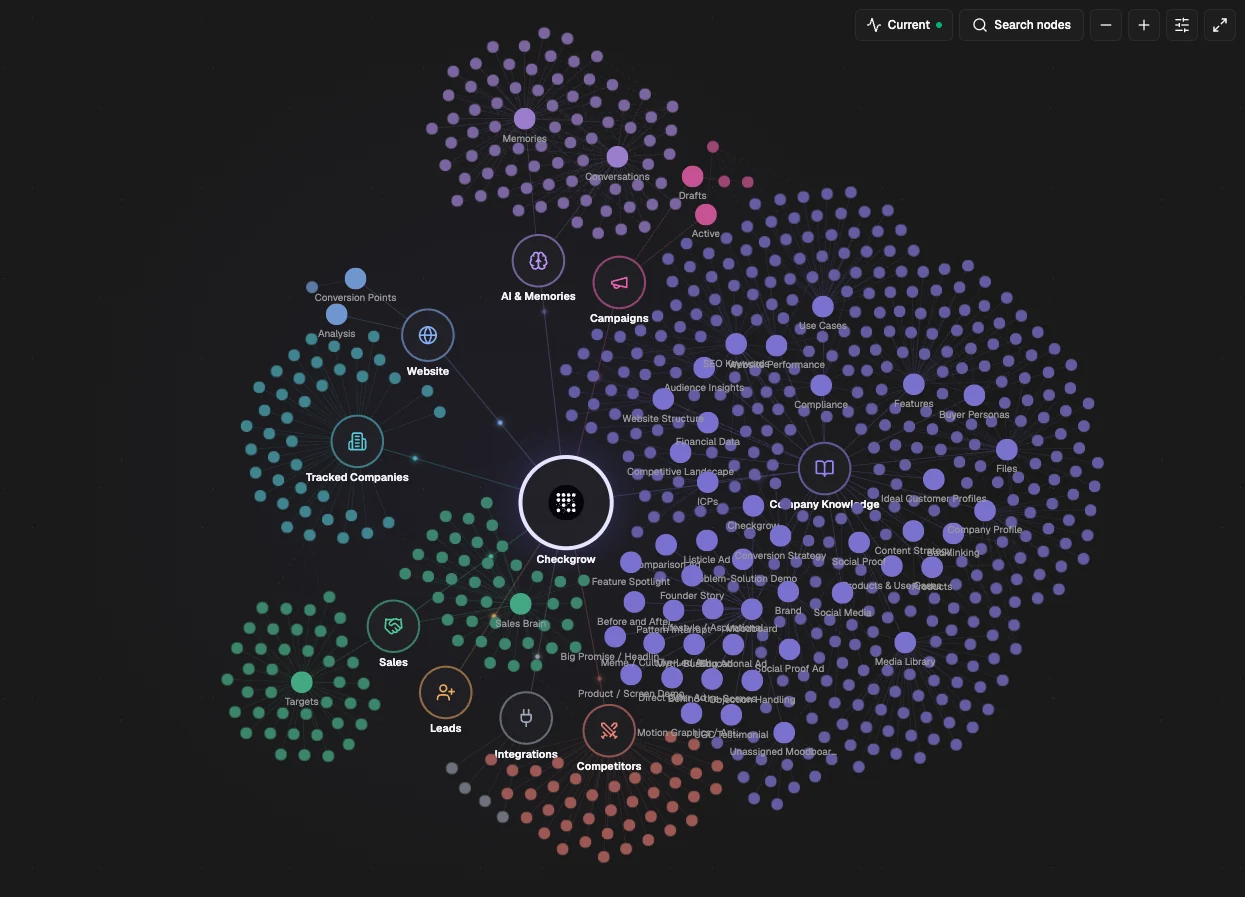
Knowledge Center, step 1 of 3: Company knowledge connected to campaigns, competitors and leads.

In short
- Store your company, brand, product and buyer knowledge once, in the Knowledge Center.
- Everything Checkgrow drafts, from campaign ideas to posts and creatives, starts from that knowledge.
- The Knowledge Graph shows how your knowledge connects to campaigns, competitors, website and leads.
- Drafts wait for your approval, and every knowledge change is kept for 30 days.
The problem
Every prompt starts from zero.
General AI tools don't know your positioning, your products or the people you sell to. So every prompt re-explains the brand, every draft needs rewriting, and the voice drifts a little more with each one. The more people use AI, the less the output sounds like you.
I like this. So basically, this is the source of truth that you're building, which is so essential. Absolutely. I love it.
Salim Sayed, WCMO
How it works
Four steps, all inside Checkgrow.
 01
01Teach Checkgrow your business once
Fill in your Company Profile, Brand, Products, Buyer Personas, ICPs and Use Cases, or upload files and links and let Checkgrow draft them for you to review. A completeness score shows what is still missing, and what to add next.
Completeness at a glance 02
02Write your voice down
Tone of voice and brand message live in one place, with the words you use and the ones you avoid, so every piece of content reads from the same rules, whoever asks for it.
One voice for every draft 03
03Describe the people you sell to
Buyer personas capture who they are, what they need, what holds them back and how they decide, so campaigns, posts and sales messages speak to a real person.
A real buyer, described once 04
04See how it all connects
The Knowledge Graph maps your company knowledge to your campaigns, website, competitors and leads in one view, so gaps and links are visible at a glance.
Everything links to your company
See it work
A draft in your voice, waiting for your approval.
Content arrives ready to refine. Ask for changes in the chat beside it, and the saved version only changes after you approve. Nothing is published without a person saying yes.


What you get
What changes for your team.
First drafts in your voice
Everything Checkgrow writes starts from your brand, products and buyers, not from a blank prompt.
One source of truth
Update your positioning once, and every draft after that uses the new version, for every person on the team.
Full control
Nothing is sent without approval, and a 30-day history shows every change to your knowledge.
The key thing I see is it's got one central database, a source of truth, which is ultimately one of the biggest things in all of this AI implementation.
In practice
Teams already doing this.
FAQ
Questions teams ask before they start.
What is a brand knowledge base for AI?
It is one structured place that holds what makes your company specific, such as your brand voice, products, buyer personas, ideal customer profiles and use cases, so AI tools write from your facts instead of generic assumptions. In Checkgrow it is the Knowledge Center, and every AI feature reads from it.
Where does the knowledge come from?
From you. Fill in the sections directly, or upload files and links and let Checkgrow draft them for you to review and edit before anything is saved.
What happens when our positioning changes?
Update it once in the Knowledge Center, and everything Checkgrow writes afterwards uses the new version. A 30-day history shows what changed and when.
Will anything be published without our approval?
No. Content waits until someone sends it, and changes made in the chat apply only after you approve them.
Can Checkgrow make videos?
Not yet. Creative Studio is in beta and makes images and copy. Review generated product images before you use them, as they can differ from the real product.
Can an agency keep several brands apart?
Yes. Each workspace has its own Knowledge Center, so every client's brand, products and buyers stay separate.
Related use cases
Keep exploring.

Last updated 14 October 2026. Product screens are illustrations of Checkgrow; figures are examples.